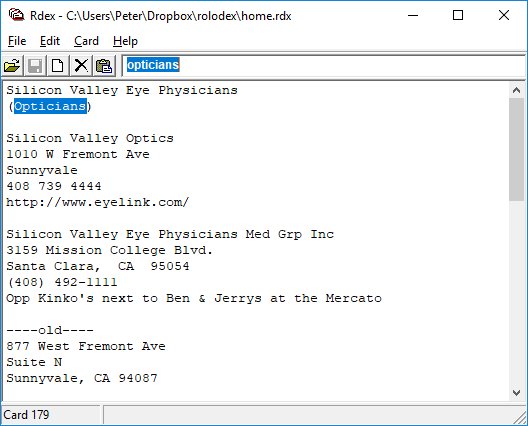
Rdex is a freeform database. Use it to store addresses, phone numbers, birthdays, online ids, recipes, or a million other pieces of miscellaneous information. It is based on the idea of a cardfile—like a Rolodex. Just click "New Card," copy and paste (or type in) some info and click save. Simple! Later, you can search for any text contained in the card and the card will be displayed. Just type the word you are searching for into the search box at the top.
Programs similar to Rdex were readily available a while back but seem to have gone out of fashion recently. I have found this to be a very useful way of keeping info over the years. So when my old 16-bit cardfile finally bit the dust, and I couldn't find a replacement, I wrote one—Rdex. Rdex has the same look and feel as my old cardfile app—Quickdex for Windows, by Stellar Software.
To create a new card, click on the "New" button, press <Ctrl+N>, or select "Card/New Card" from the menu. Just copy <Ctrl+C> and paste <Ctrl+V> text into the card. If you want to make the "List View" function meaningful, use the first line of the card as a title.
To find a card, type a string in the Search box and press <Enter>. Search strings are not case sensitive. Press <Enter> again to find the next occurrence or <Shift-Enter> to find the previous one. If the search string is blank, you simply jump to the next (or previous) card.
You can get a "list" of the first lines of cards that contain the text in the Search box by pressing <Alt-Enter> or selecting <Card/List View> from the menu. Double-clicking on an item in the list, or selecting an item (with the mouse or arrow keys) and pressing <Enter> displays the card.
You can delete a card by pressing the "Delete" button, pressing <Ctrl+D>, or selecting "Card/Delete Card" from the menu.
To open a new file, press the "Open" button or select "File/Open..." from the menu. If you make any changes don't forget to save your file by pressing the "Save" button or selecting "File/Save" from the menu. To print a card choose "File/Print..." from the menu. The print function is limited to a single card and a single page.
Rdex is a tiny little program that runs on any version of MS Windows. The insaller will by default install the program file into "...\Program Files\Rdex\rdex.exe". The default data file is "...\Program Files\Rdex\datafile.exe". To change the datafile simply copy the existing data file to a new location and change the "Target" field of the desktop or menu shortcut to point to the new datafile.
The data is stored as a simple ASCII file with cards separated by the ASCII character "7F". You can edit the data file with notepad or any other editor if you wish—just be careful of the card separator characters, they will probably display as an empty square.
If you are interested in programming, here is the source code. I used theForger's Win32 API Tutorial to learn how to write a Windows application. It is an excellent tutorial. For compiler and Windows header files I used MinGW. The MinGW downloads page is a little confusing, I used MinGW 5.0.2.
Rdex is freeware. It is offered completely free of charge, in the hope that it will be useful, but comes with absolutely no guarantees whatsoever.